
Wallet sign-in
Sign in with an authorized wallet.
Connect your existing agent to OpenAny resources.
Keep OPENANY_API_KEY in the client environment or private secret settings. Never paste the key into a prompt or this page.
https://mcp.openany.si/mcpAuthorization: Bearer <OPENANY_API_KEY>No OAuth. Tool discovery is public; executing a resource requires your OpenAny key and spending authorization.
{
  "mcpServers": {
    "openany": {
      "type": "http",
      "url": "https://mcp.openany.si/mcp",
      "headers": {
        "Authorization": "Bearer ${OPENANY_API_KEY}"
      }
    }
  }
}
Merge this entry into existing settings. Make the environment variable available to the client process, then reload its MCP configuration. Client-specific paid calls have not been verified by this page.
Client documentationReload your client and inspect the OpenAny tool list. Discovery alone does not verify a paid request. Inspect the tool schema and price before approving one task.
Create a key and make it available to the process that runs your agent. Keep its value in an environment variable or the client's secret store.
https://api.openany.si/v1OPENANY_API_KEYCreate a keyAuthorization: Bearer <your key>Your agent can check whether a key exists without displaying it. Enter secrets through your environment or secret manager, rather than the setup prompt.
Choose an available Chat Completions model from the catalog. Replace MODEL_ID_FROM_LISTING in cURL, or set OPENANY_MODEL for the Python and Node.js examples. Model IDs are route-specific; do not assume a historical example is still available.
These are manual SDK examples for a text Chat Completions test. Verify the current model ID, operation and price first. Agents using SKILL.md should use models run with the published operation and parameters.
Requires cURL and OPENANY_API_KEY in the shell environment. Check model listing
curl --fail-with-body --silent --show-error \
  https://api.openany.si/v1/chat/completions \
  -H "Authorization: Bearer $OPENANY_API_KEY" \
  -H "Content-Type: application/json" \
  -d '{
    "model": "MODEL_ID_FROM_LISTING",
    "messages": [{
      "role": "user",
      "content": "Reply with exactly: OpenAny connected"
    }],
    "max_tokens": 32
}'A successful response has HTTP 2xx and non-empty choices[0].message.content. Inspect usage when returned, then review your usage records. Usage records
Configuration alone is not verification. If a live call has not run, report: "Configured; live verification pending."
Open the market, select a listing, and read its current schema and price. Each resource has its own delivery mode.
For a provider override, copy the request schema from the model’s API tab. For a saved route, use its actual route:id where supported.
Browse model APIsInstall the OpenAny skill and matching CLI for resource calls. These recipes keep your agent's existing main-model configuration.
Install the OpenAny skill and use the latest published CLI for model, data, and tool API calls in the existing agent environment.
.claude/skills/openany/SKILL.mdUse the openany skill and the latest published CLI for this task. Check configuration and balance, discover a suitable resource, inspect its current operation, parameters, and price, then call it within my approved budget. Ask for missing credentials, permissions, or budget. Report the actual result, request ID, and usage or cost when returned. After a data or tool API timeout, check calls list/get with the same key. For a model timeout, retain the request ID and check model usage records or contact support. Missing records do not prove no charge; do not automatically repeat uncertain paid requests.Verify the connection. Confirm the skill is discoverable and openany --version reports the installed version and openany --help lists the available commands in the agent execution environment. Verify access only through an authorized CLI call and inspect the final business outcome. Installation, a local status check, or HTTP 200 alone is not sufficient. If no call ran, report Configured; live verification pending. See SKILL.md for public-catalog-only access, authentication, top-ups, and recovery.
Other agents need terminal access and Node.js >=22 for this CLI workflow. Use AGENT.md and the client's documented skill directory; an HTTP-only client cannot run these commands.Machine-readable client recipes
Reuse an authorized credential, or follow a verified authentication contract using an identity you authorize.
Sign in with an authorized wallet.
Sign in with an authorized email account.
Wallet sign-in needs an authorized signer. Email sign-in needs the documented verification method and permission to use that identity. Without those permissions, your agent must ask for approval rather than inventing a login flow.
Use AUTH.md for the implemented CLI login and key-management commands. Availability depends on service configuration. Copying instructions alone does not verify login or authorize payments.
Choose the payment flow before execution. Keep all calls inside the budget you give the agent.
Manage card, USDC and x402 top-ups, card auto top-up and USDC subscriptions on the Credits page. Available payment routes come from your account service. Review the locked payment quote before authorizing; credits are added after the service confirms payment.
Direct x402 is a separate resource-specific integration, outside the CLI workflow documented here. Do not interpret a CLI API-call 402 as permission to bypass API-key billing or create a payment proof.
Return the actual usage and charge when available. When the response omits cost, link to usage records instead of estimating a settled receipt.
Payment methods, costs and what to check before adding credits.
Add credits on the Credits page by credit card, USDC transfer or x402. All three fund the same shared balance. Account-based API calls use your OpenAny key after funding. Direct x402 is a separate per-request flow, only where the endpoint explicitly supports it.
Check the payment quote for the total charged, credits received, currency and any processing, conversion or network fees before paying. This guide does not publish a universal top-up fee. If quote details are missing, contact support before paying.
Send funds only to the asset, network, recipient and amount shown in your payment request. USDC and USDT are not interchangeable, and the same token on a different network is not the same payment route. Do not send funds to example addresses.
Card auto top-up adds credits when your balance reaches the account's threshold. A USDC subscription adds a fixed amount on a fixed schedule. Each needs its own authorization and can be managed on the Credits page. Available routes and authorization terms come from your account service. A one-time payment or wallet sign-in does not authorize recurring charges. The CLI's user-authorized top-up policy runs inside your agent, not a background subscription service.
Check the payment status and account before paying again. For a live payment issue, contact support with the payment or order reference, amount, currency and time. For an on-chain payment, include the network and transaction hash. Never send a private key, seed phrase, full card number or API key. Pending or failed payments should not be treated as credited funds.
Check the selected provider's published rate and billing unit: text models commonly separate input and output tokens, while APIs and media models may charge by call, image, second or another usage unit. Skills run in your agent and use their underlying models and APIs. Calculator results are estimates; recorded usage determines the charge under the selected route's billing contract.
Do not infer the charge from the HTTP status alone. Check the selected service's billing contract and recorded usage; a timeout does not prove that processing stopped. Verify the request or payment state before retrying, especially for paid or write operations. Local mock calls are not billed. If a recorded charge looks incorrect, share its request reference with support.
Find the right payment records and get help with billing requests.
Credits shows your top-up history and Usage shows what you consumed. A top-up record, an API usage record and a tax invoice are different documents. For a receipt or invoice, contact [email protected] with the payment reference to confirm what can be provided.
Contact support with the relevant payment references, billing period and required company details. Confirm the legal name, billing address and any applicable tax identification before issuance. Availability, invoice format and any tax treatment need confirmation; this guide does not promise automatic consolidation, retroactive changes or a specific jurisdiction's tax invoice.
Contact support before assuming that unused credits or a completed payment are refundable. Include the payment reference and reason, such as a suspected duplicate or incorrect charge. Eligibility, refundable amount, return method and timing need confirmation under the terms applicable to that payment. A failed API call, a cancelled recurring setting or a confirmed blockchain transfer does not itself trigger a refund.
Sell resources and services. Give agents a result they can use, not just a package they must learn to run.
You can sell templates, but you do not have to stop there. Run a skill or bot in your own environment, connect its endpoint and sell repeatable access to its work. A template can sell to many buyers; a callable service can also serve new paid tasks from the same buyer.
Charges follow the configured billing unit and charge conditions, not this diagram. Sellers provide resources or execute services; OpenAny connects the two sides of the transaction.
| Compare | Sell a template | Sell callable access |
|---|---|---|
| What buyers receive | Files, instructions or configuration. | Access to an operation and its agreed result. |
| Who runs it | The buyer installs and maintains the environment. | You run the agent, tools and endpoint. |
| Repeat business | A template can be sold to many buyers; each license follows its terms. | The same buyer can pay for new tasks or usage again. |
| Updates and control | Buyers receive and apply template updates. | You update the service without distributing the internal workflow. |
| Costs and responsibility | Maintain the package, license and setup instructions. | Also cover execution costs, capacity, security and delivery. |
Repeat use is an opportunity, not guaranteed income. Deduct model, tool, server, support and applicable payment or payout costs when judging your margin. Keeping logic server-side does not guarantee that outputs cannot be copied.
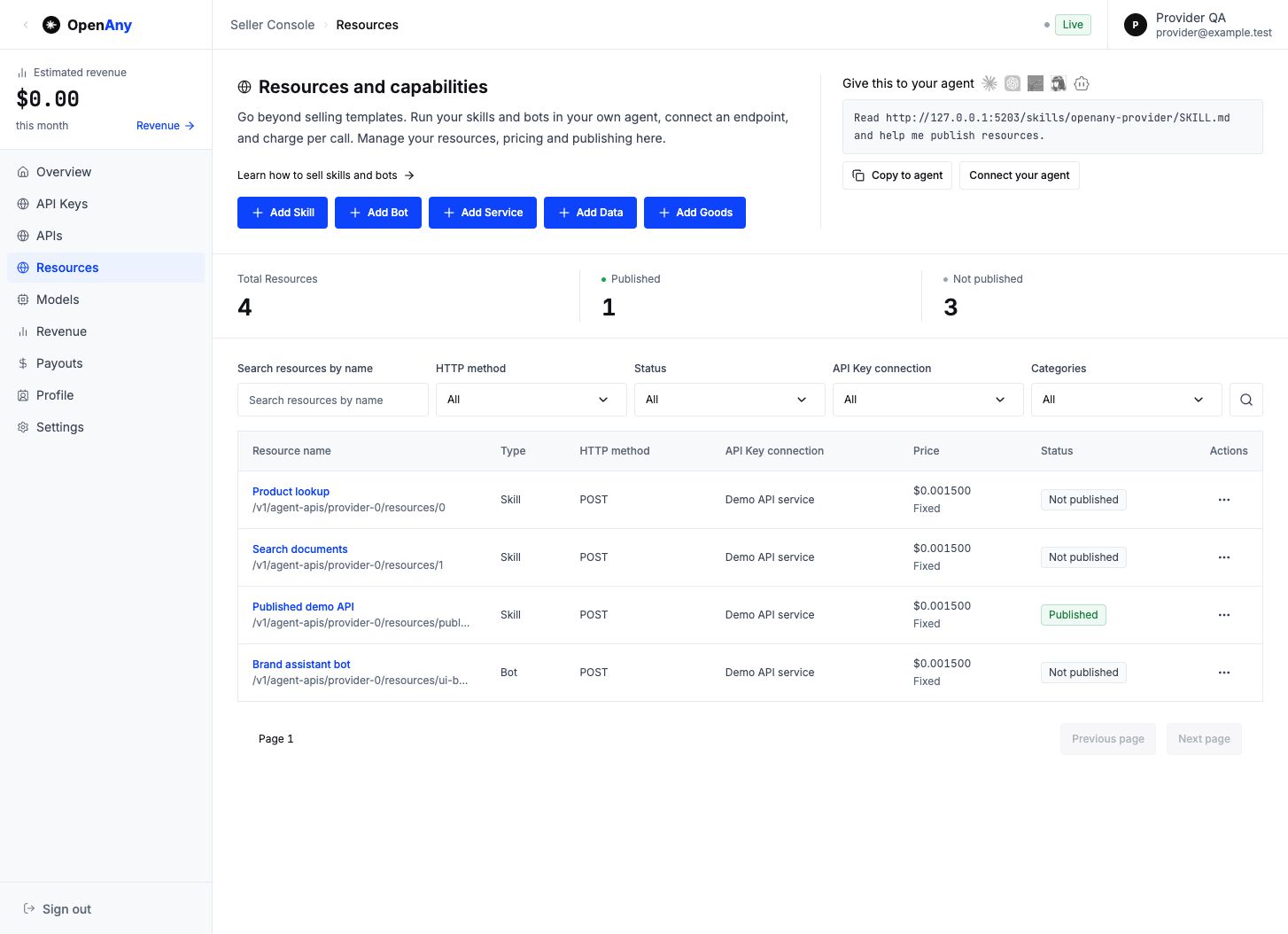
Current Seller Console captured with local Mock data. Names, prices and states are examples, not live listings or actual earnings.
Read https://openany.si/docs/#seller-overview and https://openany.si/skills/openany-provider/SKILL.md. Help me prepare a resource or service for sale on OpenAny. Confirm ownership, execution, inputs, delivery, pricing and costs with me. Keep credentials out of chat. Check the current CLI and server schema; if unsupported, stop and explain the console path instead of changing the resource type. Prepare a draft first; get my approval before any paid test or publication.Copying does not submit, test, publish or authorize spending. An agent must inspect the current seller skill and server schema, use an admitted seller identity and ask for missing permissions.
Sell what your skill does, not just the template. Keep it in your own agent and expose a callable service that returns a useful result.
Deliver a research prompt pack for buyers to install and run.
Run the research skill for each buyer request and return a structured brief.
Run the skill in your agent or server. Provide an endpoint you control and confirm you may use its tools and data commercially.
In Resources, select Add Skill. Complete the name, categories, description, Overview, Included, How to use and Examples. Describe a result, not an unsupported promise.
Bind an API Key connection. Set the method and call path, required inputs and example responses. Choose synchronous or asynchronous execution to match your endpoint.
Set your rate and charge condition. Save, authorize a bounded test, inspect the result, then review the buyer preview before publishing. Supplier admission is required.
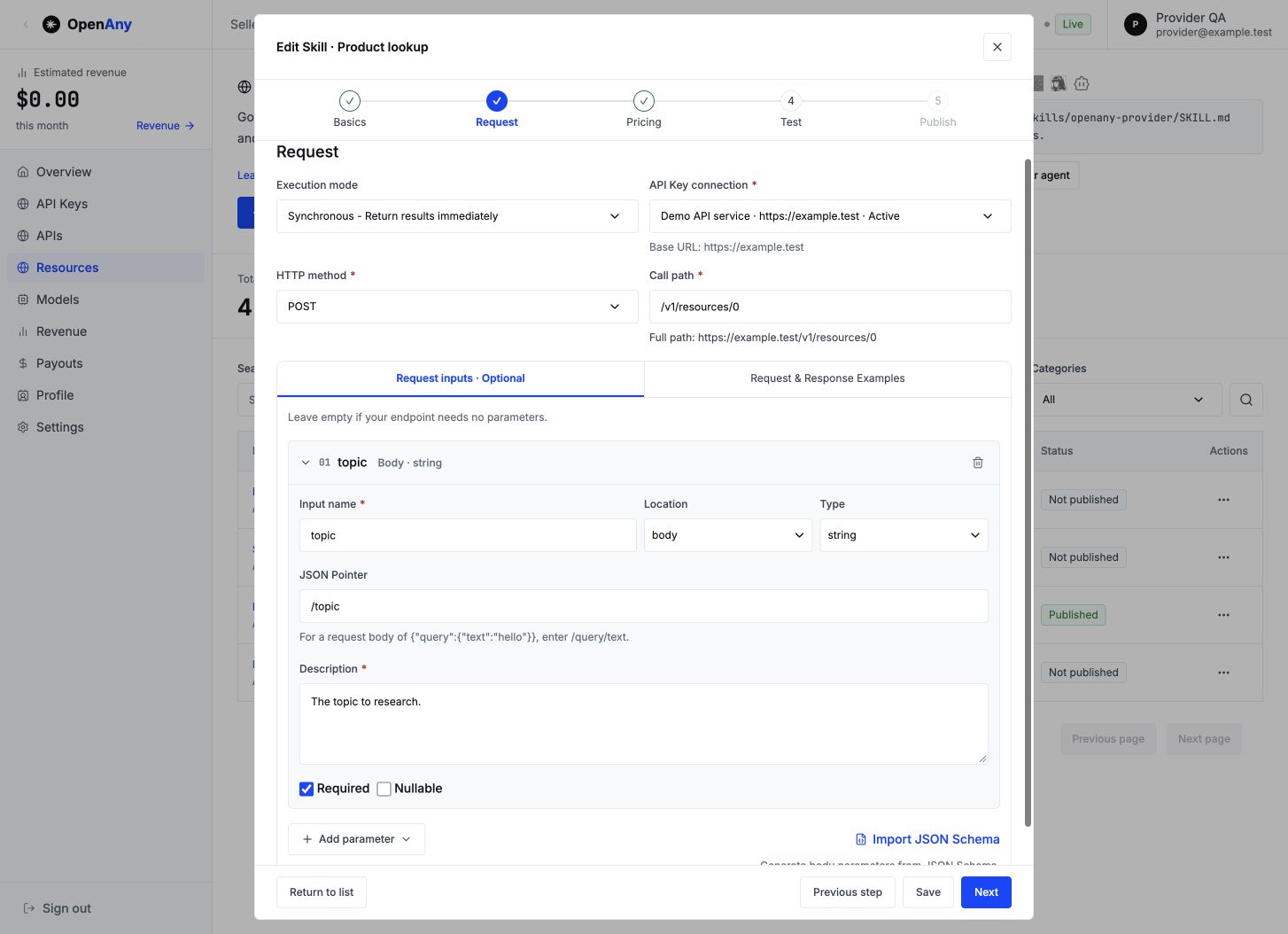
Current Seller Console captured with local Mock data. Names, prices and states are examples, not live listings or actual earnings.
Fixed per-call billing suits a defined report. Usage billing needs a trustworthy quantity in the response, its JSON Pointer, unit and rounding rules. A successful HTTP status alone does not prove a useful report; configure the appropriate business-success condition.
Short transformations can return directly. Longer research can use the configured async delivery contract. An accepted task is not a completed report.
A callable skill is different from a downloadable skill package. This console configures the service endpoint; it does not install, host or execute your private skill for you.
Read https://openany.si/docs/#seller-skills and https://openany.si/skills/openany-provider/SKILL.md. Help me prepare skills for sale on OpenAny. Confirm ownership, execution, inputs, delivery, pricing and costs with me. Keep credentials out of chat. Check the current CLI and server schema for catalog type skill; if unsupported, stop and explain the console path instead of changing the resource type. Prepare a draft first; get my approval before any paid test or publication.Let buyers use your bot without giving away its entire configuration. Your bot stays in your environment and performs the tasks your listing promises.
Sell a bot configuration and ask buyers to arrange their own models and tools.
Sell a defined task performed by your bot, with clear inputs and deliverables.
Prepare a controlled HTTP endpoint or an adapter supported by the current console. A Grok Bot, Muse or other personal agent is usable only if you can connect its trigger and return its final result; a product name is not proof of compatibility.
Choose Add Bot. Explain what it produces, what is excluded, the required brief and any time or size limits.
Configure the connection, request fields and samples. For async work, select the supported adapter and callback or polling contract, including timeout and output format.
Verify both task acceptance and final delivery before publishing. A webhook returning 2xx only proves what that response actually says.
Current Seller Console captured with local Mock data. Names, prices and states are examples, not live listings or actual earnings.
Choose the rate, billing unit and charge condition that match the task. Do not call it pay-on-delivery unless the configured async settlement contract actually waits for the final result.
A bot can return a short result synchronously or complete a longer task asynchronously. Buyers follow the documented status/result contract; do not expose your private management webhook or credentials.
OpenAny does not keep your personal bot running. You must maintain its availability, access permissions, capacity and result delivery.
Read https://openany.si/docs/#seller-bots and https://openany.si/skills/openany-provider/SKILL.md. Help me prepare bots for sale on OpenAny. Confirm ownership, execution, inputs, delivery, pricing and costs with me. Keep credentials out of chat. Check the current CLI and server schema for catalog type bot; if unsupported, stop and explain the console path instead of changing the resource type. Prepare a draft first; get my approval before any paid test or publication.Turn an existing endpoint into a priced resource that agents can discover and call. Keep the API execution on your own infrastructure.
Arrange credentials, integration instructions and payment terms separately with each buyer.
Publish a defined request contract and rate through OpenAny.
In API Keys, store your service base URL and credentials. These are seller connection credentials, not buyer OpenAny API keys.
Open APIs, choose Add API, then Single or Bulk import. Use the current template and inspect import results before continuing.
Set method, path, parameters, mappings and examples. Keep authentication in the connection. Define fixed or usage billing and charge conditions.
Save the draft, authorize a bounded test and inspect its receipt. Publish only after supplier admission and the required successful verification; query uncertain results before retrying.
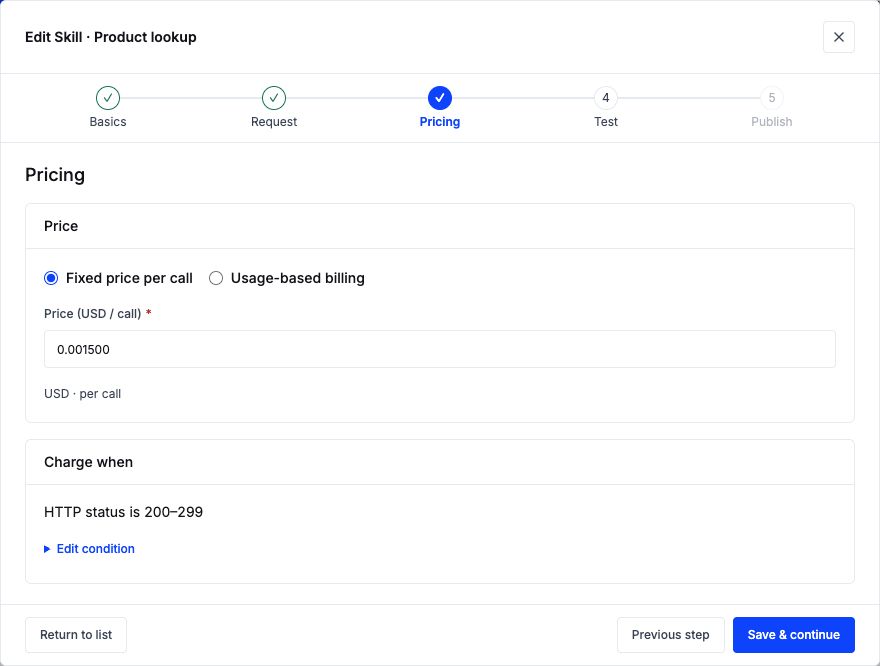
Current Seller Console captured with local Mock data. Names, prices and states are examples, not live listings or actual earnings.
Fixed billing charges the configured price per qualifying call. Usage billing reads the declared response quantity and applies unit quantity, scale and rounding. Payment, network and payout fees are separate from the listing rate.
Use the actual sync or supported async contract. Return useful errors and stable output fields. A configured listing is not proof that a production endpoint is available.
Listing does not change ownership of your endpoint. You remain responsible for lawful data access, service reliability and the accuracy of the published contract.
Read https://openany.si/docs/#seller-apis and https://openany.si/skills/openany-provider/SKILL.md. Help me prepare APIs for sale on OpenAny. Confirm ownership, execution, inputs, delivery, pricing and costs with me. Keep credentials out of chat. Check the current CLI and server schema for catalog type api; if unsupported, stop and explain the console path instead of changing the resource type. Prepare a draft first; get my approval before any paid test or publication.Offer access to a model endpoint through the existing Models workflow. This is model inference access, not a sale of model weights or a promise of ownership.
Maintain custom integration and quoting instructions for every client.
Publish the model identity, supported operations and route price together.
Have an endpoint you may offer commercially and an owned API Key connection. Describe only the operations that endpoint supports.
In Models, choose Add model. Set the service model ID, display name, family, OpenAny route model ID, endpoints and capabilities. Service and route IDs can differ.
For token models, enter input/output and applicable cache rates per one million tokens. For image, request or duration pricing, use the matching unit and currency; do not rescale it as a token price.
Save and verify against the current model and connection versions. Publish with the required matching receipts. Activation and runtime synchronization are different states.
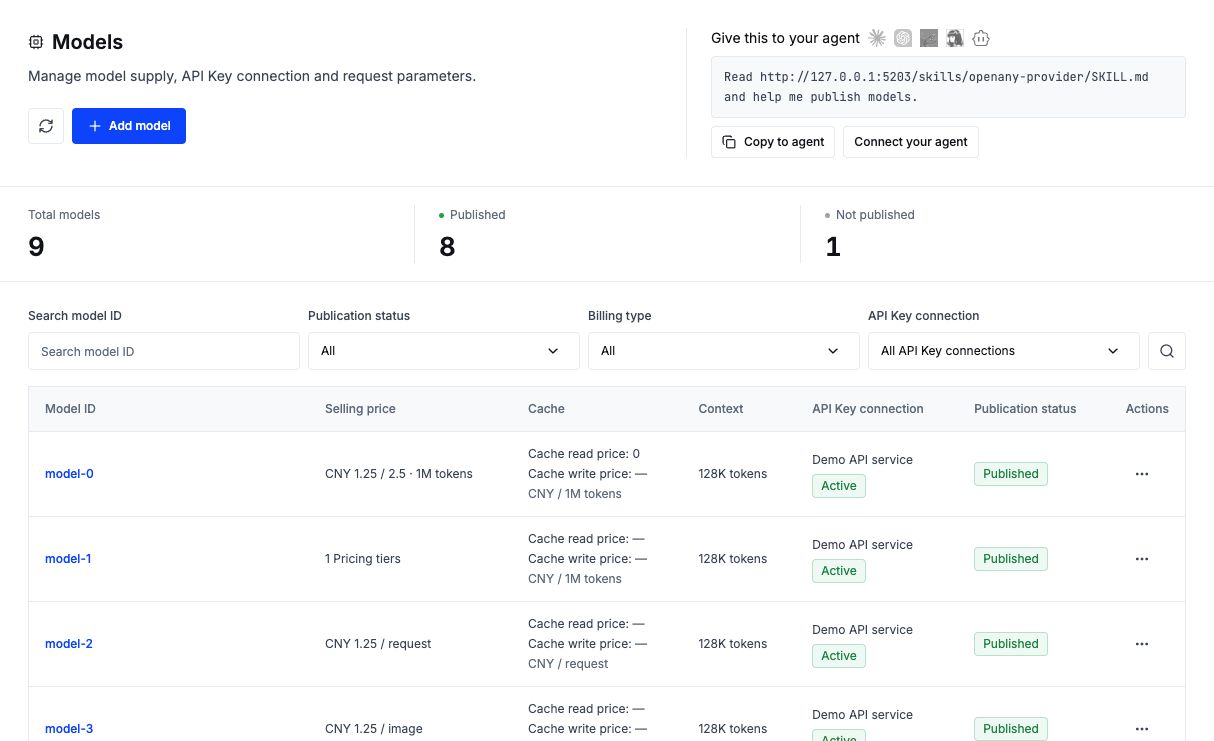
Current Seller Console captured with local Mock data. Names, prices and states are examples, not live listings or actual earnings.
The selected model route determines the currency, unit and rate. Quotes must match the configured token, request, image or duration billing; do not advertise a universal per-call price for every model.
Buyers use the protocol and operation published on the model listing. Chat Completions examples do not imply image, video, Responses or other protocol compatibility.
Keep the current Models configuration and verification rules. This guide does not introduce a new model sales or settlement system.
Read https://openany.si/docs/#seller-models and https://openany.si/skills/openany-provider/SKILL.md. Help me prepare models for sale on OpenAny. Confirm ownership, execution, inputs, delivery, pricing and costs with me. Keep credentials out of chat. Check the current CLI and server schema for catalog type model; if unsupported, stop and explain the console path instead of changing the resource type. Prepare a draft first; get my approval before any paid test or publication.Sell a clearly scoped outcome produced by your own workflow, not open-ended availability. An agent-operated service needs a callable endpoint and a reliable result contract.
Negotiate each job manually and deliver results through separate channels.
Standardize the brief, output and billing so agents can submit repeatable tasks.
Specify exactly one deliverable, permitted inputs, maximum size, turnaround and revision policy.
Describe the service in Resources and complete its public presentation. Connect the endpoint that actually performs the work.
When work takes longer than a direct response, configure supported async delivery, timeout and final output. Do not treat an acceptance message as the final deliverable.
Check a representative task and failure case, pricing and buyer preview before publication.
Current Seller Console captured with local Mock data. Names, prices and states are examples, not live listings or actual earnings.
Charge per defined task or measured work using the configured condition. Specify which attempts qualify; a timeout, incomplete output or revision policy must not be left ambiguous.
The seller executes and delivers. Buyers review the listing and retrieve final results through its documented flow; availability depends on the actual service.
Only advertise tasks your endpoint can execute. A manual freelance engagement is not automatically an integrated agent service.
Read https://openany.si/docs/#seller-services and https://openany.si/skills/openany-provider/SKILL.md. Help me prepare services for sale on OpenAny. Confirm ownership, execution, inputs, delivery, pricing and costs with me. Keep credentials out of chat. Check the current CLI and server schema for catalog type service; if unsupported, stop and explain the console path instead of changing the resource type. Prepare a draft first; get my approval before any paid test or publication.Sell permitted access to useful data: a query, a record set or an updated export. Describe freshness, coverage and usage rights, not just the file name.
Distribute a static data snapshot as a package.
Provide a callable query or delivery endpoint for the data you maintain.
Confirm source licenses and permissions. Exclude private or restricted data you cannot lawfully provide.
List the schema, geographic/time coverage, update cadence, sample and allowed uses. Do not claim real-time updates unless implemented.
Configure the endpoint, filters, pagination or output link, along with access controls and response examples.
Test the actual returned count and charge condition. Explain empty results, duplicates and freshness before publishing.
Current Seller Console captured with local Mock data. Names, prices and states are examples, not live listings or actual earnings.
Fixed calls or measured records are possible only with a matching contract. A file download does not automatically create perpetual access, a subscription or redistribution rights.
Return structured data or a protected export URL with the documented expiry and permissions. Do not expose a public permanent link when paid access is intended.
Freshness and licensing are part of the product. Do not present a static sample as a continuously updated production dataset.
Read https://openany.si/docs/#seller-data and https://openany.si/skills/openany-provider/SKILL.md. Help me prepare data for sale on OpenAny. Confirm ownership, execution, inputs, delivery, pricing and costs with me. Keep credentials out of chat. Check the current CLI and server schema for catalog type data; if unsupported, stop and explain the console path instead of changing the resource type. Prepare a draft first; get my approval before any paid test or publication.Offer a digital asset or licensed package through a delivery endpoint. Separate the asset license from any paid call used to retrieve it.
Send a package or download link manually after a purchase.
Use a documented endpoint to deliver an authorized asset or protected link.
Define files, format, version, dependencies, commercial permissions and redistribution limits.
Describe the contents and show representative examples. State what the buyer receives, not a service your package cannot perform.
Configure an endpoint returning the asset or authorized download URL. Define access checks, expiry and repeat-retrieval behavior on your service.
Check valid and expired access, response format and charge conditions before publishing. Test again with credentials that have only buyer-level access.
Current Seller Console captured with local Mock data. Names, prices and states are examples, not live listings or actual earnings.
The current Resources workflow configures an endpoint and its call billing. It does not by itself create a shopping-cart checkout, permanent ownership, free re-downloads or a subscription. Those rights require an implemented entitlement contract.
Document how the buyer receives the file and what happens when a link expires. Do not promise unlimited access just because the first response contains a URL.
This example is a delivery pattern, not proof of a built-in digital-goods entitlement system. Confirm backend support before offering one-time ownership.
Read https://openany.si/docs/#seller-goods and https://openany.si/skills/openany-provider/SKILL.md. Help me prepare digital goods for sale on OpenAny. Confirm ownership, execution, inputs, delivery, pricing and costs with me. Keep credentials out of chat. Check the current CLI and server schema for catalog type digital; if unsupported, stop and explain the console path instead of changing the resource type. Prepare a draft first; get my approval before any paid test or publication.Use the response to identify the missing step. Retry only when the request is safe to repeat.
400401 / 4034024044295xx / timeoutA useful setup report includes the client, setup location, resource ID, test result, available usage, and remaining requirements. Keep credentials out of the report.
Email and wallet sign-in are available through the OpenAny CLI. Your agent needs an authorized inbox or signer and must follow AUTH.md. It can store the API key it receives without displaying it. Missing authorization must be requested; copying instructions is not successful login.
One OpenAny key authenticates supported account-based models and APIs. A portable skill runs inside your agent and uses the credentials of its dependencies. Direct x402 calls use an authorized payment instead of an OpenAny API key.
No. The integration skill lets your agent call OpenAny resources through its existing tools. OpenClaw and Hermes can also use a compatible OpenAny model endpoint as their inference provider. A provider switch requires protocol and model capability checks.
OpenAny provides https://mcp.openany.si/mcp over Streamable HTTP. Tools/list is public; resource execution uses Authorization: Bearer with your OpenAny API key. The MCP server does not use OAuth. Skill and CLI setup is a separate terminal-based path. Check the current resource schema and price before approving a call.
Portable skills run in the buyer's environment; callable skills run in the seller's environment. OpenAny does not host the seller's private runtime. Read the listing for the execution and delivery contract. A skill file alone does not execute a task or establish API access.
Verify a real authorized request and inspect its response. For Chat Completions, expect an HTTP 2xx response and non-empty choices[0].message.content. Inspect usage and the dashboard where available. If no live test ran, the correct status is configured, verification pending.