

Seedance 2.5 Flash
Use the Seedance 2.5 Flash API to generate short videos from text, opening and closing frames, or image, video, and audio references. Describe the subject, movement, camera work, and sound to create a 4–30 second clip at 480p or 720p. Animate product photos, connect storyboard frames, or explore variations of the same scene with optional synchronized audio. The detail page includes request examples, supported parameters, provider routes, and usage pricing.
Overview for yir
Seedance 2.5 Flash
Seedance 2.5 Flash: Video Generation with Text, Frames, and Multimodal References
Seedance 2.5 Flash is the fast tier of ByteDance’s Seedance 2.5 family. Create 4–30 second clips at 480p or 720p, with optional synchronized audio. Start with a written scene, animate an opening image, connect opening and closing frames, or guide a new clip with image, video, and audio references.
Watch Seedance 2.5 Flash in action
These published examples show three Flash workflows. Renoise identifies them as its Flash generations. They are externally published demonstrations, not OpenAny API tests or results of the request templates below.
Text to video: a connected scene
Text to video: a connected scene ↗ ↗
A food-stall scene combines character action, a camera move, and dialogue. What to inspect: Watch how the camera transition relates to each action. Listen for the timing of speech and environmental sound.
Reference to video: a portrait-led product clip
Reference to video: a portrait-led product clip ↗ ↗
A portrait reference guides a vertical coffee-mug presentation. What to inspect: Compare facial features and hand placement through the clip. Check whether speech and mouth movement agree.
Image to video: animate an opening frame
Image to video: animate an opening frame ↗ ↗
A workshop opening frame becomes a scene with a carpenter at work. What to inspect: Follow the hands and tools. Inspect lighting, clothing, and background stability as the shot develops.
Published example source and workflow notes
Official Flash scene examples
Dreamina also publishes three Flash concepts. Open the original clips for the manufacturer’s demonstrations. These CDN URLs use a nonstandard filename suffix, so they remain direct links rather than embedded players in the current OpenAny renderer.
Product motion: An earbud case is presented as a product-motion concept.
Animated campaign artwork: A lemonade poster combines product animation with graphic elements.
Storyboard atmosphere: An alley scene explores a character entrance, camera movement, and lighting.
Dreamina’s official Seedance 2.5 Flash demonstration page
Turn a brief into a useful video test
Choose the workflow that expresses your idea with the fewest inputs. Keep one clear action in a short draft, then change one variable at a time when comparing alternatives.
Creative task | Start with | Useful first test | Review before publishing |
|---|---|---|---|
Product reveal | A product photo as first_frame | One simple reveal and a restrained camera move | Shape, labels, reflections, and hand contact |
Campaign variations | A written brief or reference images | Keep the subject consistent; change framing or setting | Whether the key action is clear and the branding is accurate |
Storyboard transition | An opening frame and optional closing frame | Describe the action connecting the frames | Spatial continuity and whether the ending fits the brief |
Dialogue or atmosphere | A scene description with sound direction | A short line or a small set of ambient sounds | Timing, lip movement, and whether audio serves the scene |
Three original prompt briefs to adapt
The following briefs are OpenAny writing templates, not the prompts used for the published videos. They have not been executed. Choose the matching mode and provide your own reference URLs when needed.
Product photo to moving shot
Animate the supplied product photo. Keep the blue ceramic teapot’s shape and painted pattern consistent. A hand enters slowly, lifts the lid, and places it beside the pot. Use one steady close shot, soft window light, and quiet room ambience. Do not add labels or captions.
A scene from text
Inside a small bakery before opening time, a baker places three fresh loaves on a wooden shelf. The camera moves gently from the counter toward the shelf and settles on the warm crust. Include soft footsteps and the sound of paper wrapping. One continuous shot, no dialogue or on-screen text.
Reference-led style exploration
Use the first reference for the room layout and the second for the material palette. Create a new shot of morning light moving across the table as a person opens the curtain. Keep the camera movement subtle and add quiet outdoor birdsong. Do not reproduce any text from the reference images.
Build the request in three steps
Choose the input. Use text for a new scene, image for opening and optional closing frames, or reference for mixed image, video, and audio guidance.
Set the draft. Pick 480p or 720p, a duration from 4 to 30 seconds, and whether to request audio. Use auto for the aspect ratio in image mode.
Review the same task. Submit once, retain the task ID, and query it until completion. Inspect motion, continuity, audio, and the returned parameter notices before creating another variant.
Choose an input mode
Mode | References | How to use it |
|---|---|---|
Text to video | None | Describe the scene, motion, camera, and optional sound. |
Image to video | 1 first_frame; optional 1 last_frame | Use public HTTPS image URLs. The output follows the image aspect ratio. |
Reference to video | 1–20 total: up to 10 images, 5 videos, and 5 audio clips | Use reference_image, reference_video, and reference_audio roles. Select a reference task type when needed. |
Parameters and limits
Parameter | Allowed values and default |
|---|---|
duration | Duration: Output video duration in seconds. Only in text, image. Values: 4 to 30. Default: 5. |
duration | Duration: Output video duration in seconds. With a reference video, “auto” follows the input video for edits; aspect_ratio must also be auto. task_type edit implies auto. Only in reference. Values: 4 to 30, auto. Default: 5. |
resolution | Resolution: Output resolution. Values: 480p, 720p. Default: 720p. |
aspect_ratio | Aspect ratio: Output aspect ratio. Only in text, reference. Values: auto, 21:9, 16:9, 4:3, 1:1, 3:4, 9:16. Default: auto. |
aspect_ratio | Aspect ratio: Output aspect ratio. Only in image. Values: auto. Default: auto. |
return_last_frame | Return last frame: Return the final video frame as an additional image when supported by the selected supply. Values: false, true. Default: false. |
generate_audio | Generate audio: Generate native audio with the video. Values: false, true. Default: true. |
n | Outputs per request: Number of outputs from one API request (one Job), not the application batch size. For multiple Jobs, submit separate requests; n=1 does not prevent application-managed batching. Values: 1. Default: 1. |
task_type | Task type: How the references are used. auto (default) lets the model decide from the references and prompt. reference generates a new video guided by them. edit changes the reference video (4 to 30 seconds); its duration and aspect ratio follow that video. extend continues the reference video; aspect_ratio follows it and duration is the length of the new part. The model still checks the prompt, so a prompt that reads as an edit (for example “replace” or “copy exactly”) can fail as reference; edit and extend run on fewer channels. Only in reference. Values: auto, reference, edit, extend. Default: auto. |
The Standard request uses nested input.prompt and parameters. Reference URLs must be directly accessible HTTPS links, no longer than 2,048 characters, and no larger than 100 MiB per file. Base64, data URLs, and multipart generation bodies are not supported. An edit follows the reference video duration and aspect ratio. For duration: "auto", supply a reference video and use aspect_ratio: "auto". For extend, duration is the newly generated portion. The available edit and extend channels are more limited.
Quickstart: text to video
Send POST https://api.openany.si/v1/videos with your OpenAny authorization header. The following scene is adapted from the published model request example. It has not been run as part of this collection.
json
{
  "model": "seedance-2.5-flash",
  "route": {
    "provider": "yir"
  },
  "route_mode": "balanced",
  "input": {
    "type": "text",
    "prompt": "A paper boat drifting down a rainy city street, slow tracking shot"
  },
  "parameters": {
    "duration": 5,
    "resolution": "720p",
    "aspect_ratio": "auto",
    "return_last_frame": false,
    "generate_audio": true,
    "n": 1
  }
}
Keep the returned task ID. Poll GET https://api.openany.si/v1/videos/{task_id} using the same authorization header. A queued, running, or delivering task is still in progress. After success, read the video URL from result.files. Inspect a failed task before submitting another request.
bash
curl 'https://api.openany.si/v1/videos/YOUR_TASK_ID' \
  -H 'Authorization: Bearer $OPENANY_API_KEY'
YOUR_TASK_ID is a placeholder. Submission and query responses in the API tab are illustrative templates, not live results.
Animate a reference image
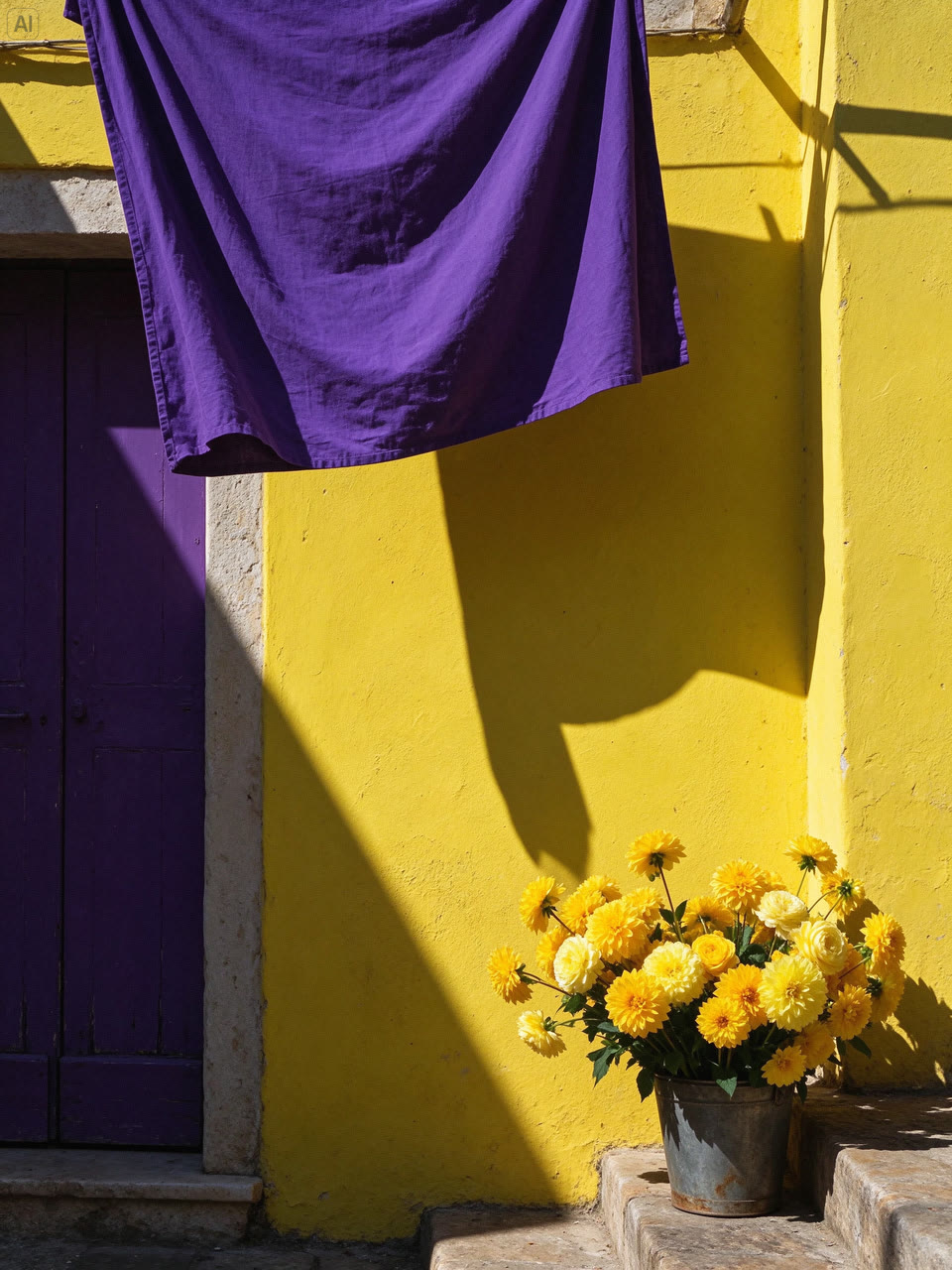
The image below is an example input: a published Seedream 5.5 street-corner photograph. It is not an output from Seedance 2.5 Flash. Replace it with your own public HTTPS image when adapting the request.
json
{
  "model": "seedance-2.5-flash",
  "route": {
    "provider": "yir"
  },
  "route_mode": "balanced",
  "input": {
    "type": "image",
    "prompt": "Animate the street in the reference image with a slow forward camera move. Let the hanging fabric sway gently and add quiet outdoor ambience. Preserve the buildings and afternoon lighting.",
    "references": [
      {
        "role": "first_frame",
        "url": "https://yir.ai/images/models/seedream-5-5/street-corner.jpg"
      }
    ]
  },
  "parameters": {
    "duration": 5,
    "resolution": "720p",
    "aspect_ratio": "auto",
    "return_last_frame": false,
    "generate_audio": true,
    "n": 1
  }
}
To add a target ending image, append a second URL object with role: last_frame. Keep the first image as first_frame. Both references are inputs; no generated output is claimed for this template.
Use multimodal references
The next template uses one image as visual guidance. To include video or audio, add public HTTPS URLs with the corresponding reference roles. The request supports at most 10 images, 5 videos, and 5 audio clips, 20 total. A reference video changes the pricing basis and can introduce minimum usage.
json
{
  "model": "seedance-2.5-flash",
  "route": {
    "provider": "yir"
  },
  "route_mode": "balanced",
  "input": {
    "type": "reference",
    "prompt": "Use the reference image as visual guidance for a new short scene. Move slowly along the sunlit street while fabric shifts in a light breeze. Keep a warm color palette and add quiet outdoor ambience.",
    "references": [
      {
        "role": "reference_image",
        "url": "https://yir.ai/images/models/seedream-5-5/street-corner.jpg"
      }
    ]
  },
  "parameters": {
    "duration": 5,
    "resolution": "720p",
    "aspect_ratio": "auto",
    "return_last_frame": false,
    "generate_audio": true,
    "n": 1,
    "task_type": "auto"
  }
}
The videos at the beginning are attributed external Flash examples. They were not generated from these OpenAny templates. No live OpenAny response has been collected for the templates above.
Billing and usage limits
The OpenAny reference selling prices below include the current 10% platform markup once. They use the lowest published eligible channel quote collected on November 17, 2026. The source quote is precharged by duration and may be settled on actual token usage, so the final task charge can differ.
Resolution | OpenAny reference price | 5-second illustration | Coverage |
|---|---|---|---|
480p | USD 0.069432 per second | USD 0.34716 | No reference video; reference estimate, not a fixed invoice. |
720p | USD 0.156112 per second | USD 0.78056 | No reference video; reference estimate, not a fixed invoice. |
Final charge = the completed task’s settled generation cost × 1.10, rounded up to the platform billing precision. The markup is already included in the reference prices. Reference video adds input-video usage and may trigger a minimum token floor. Channel failover can change the selected price. The Playground does not show a numeric estimate for requests whose actual media usage is unknown.
The manufacturer lists USD 7 per million video tokens without video input and USD 4.30 per million combined input and output video tokens with video input. Its per-second examples are estimates for a specified frame size and duration. They are not fixed universal tariffs. After the platform markup, the current reference selling prices are not lower than the manufacturer estimates shown in the source comparison; no savings claim is made.
Common questions
Can I use image URLs?
Yes. Use a public HTTPS URL and the appropriate role in input.references. Image input needs an opening frame and accepts an optional closing frame.
Can I generate silent video?
Set generate_audio: false. Review the returned parameter notices: a channel may report that a parameter was ignored or that audio was included.
Can I get the last frame?
Set return_last_frame: true. It is returned as an additional image when the selected channel supports it.
Where do I find the generated video?
Query the same task ID through GET /v1/videos/{task_id}, wait for success, and read result.files. Keep the original task ID while waiting to avoid a duplicate generation request.